
Every recipe you love, in one place — ready to cook.
Bring in recipes from links, photos and documents — Dishfile's AI turns them into editable recipes you review and save. Scale in a tap, translate between English and Hebrew, and cook step by step with timers and a screen that stays awake.
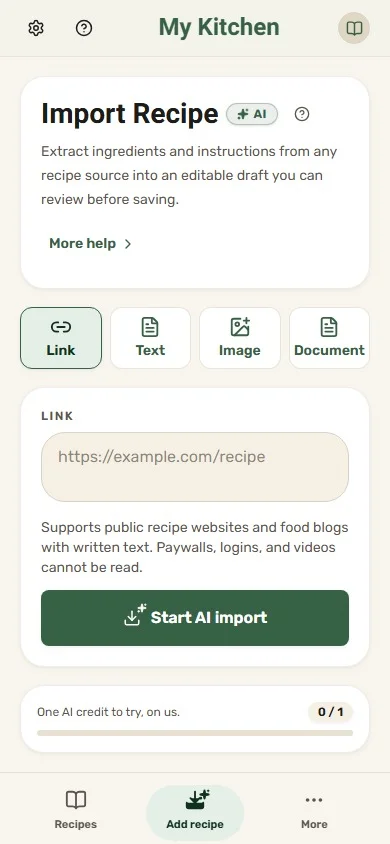
Bring recipes in from anywhere
- Recipe websites
- Photos of recipe cards
- PDF and Word (.docx)
- Typed or pasted text
- Links and files shared from your phone
Save it. Scale it. Cook it.
Three steps from a recipe you found to a dish on the table.
- 1
Save it
Paste a link, snap a recipe card or upload a document. You review what the AI read, fix anything it got wrong, and save a clean recipe.
- 2
Scale it
Halve it, double it, or set the servings you need. Quantities recalculate with kitchen-friendly fractions like ½ and 1⅓.
- 3
Cook it
Follow one step at a time with the ingredients it needs, tap-to-start timers, and a screen that won't go to sleep.
Made for when your hands are covered in flour
Bring in a recipe, check it, save it
Paste text or a link, snap a recipe card or upload a document. Dishfile's AI fills in the recipe, and you review every field before it's saved.
- Ingredients, amounts and steps laid out for you to check
- Credit where the recipe came from
- Works in English and Hebrew
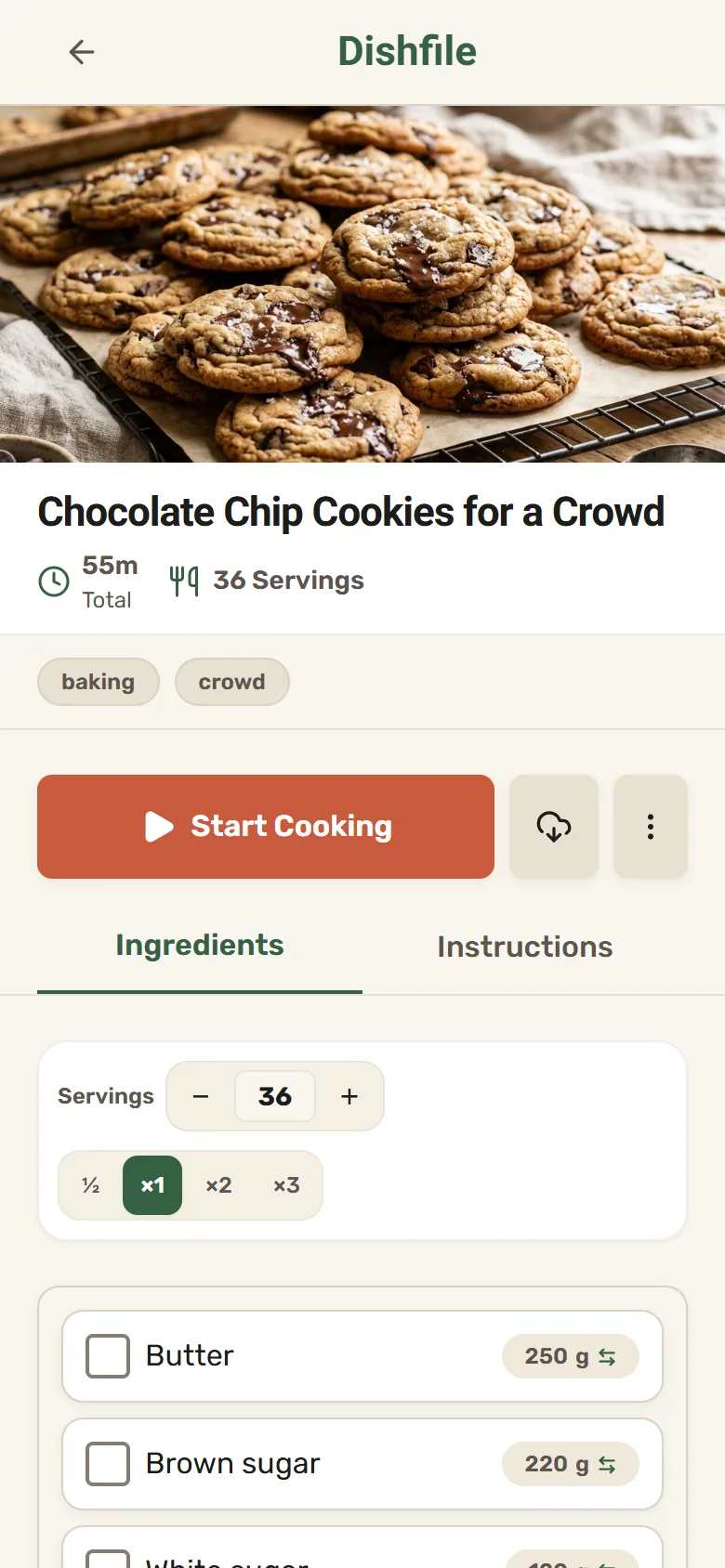
Scale any recipe in a tap
Pick ½, ×2 or ×3, or type the servings you need. Every quantity follows, components included.
- Kitchen fractions instead of long decimals
- Prep, cook and total time on every recipe
- Warnings when a step needs time ahead, like an overnight rest
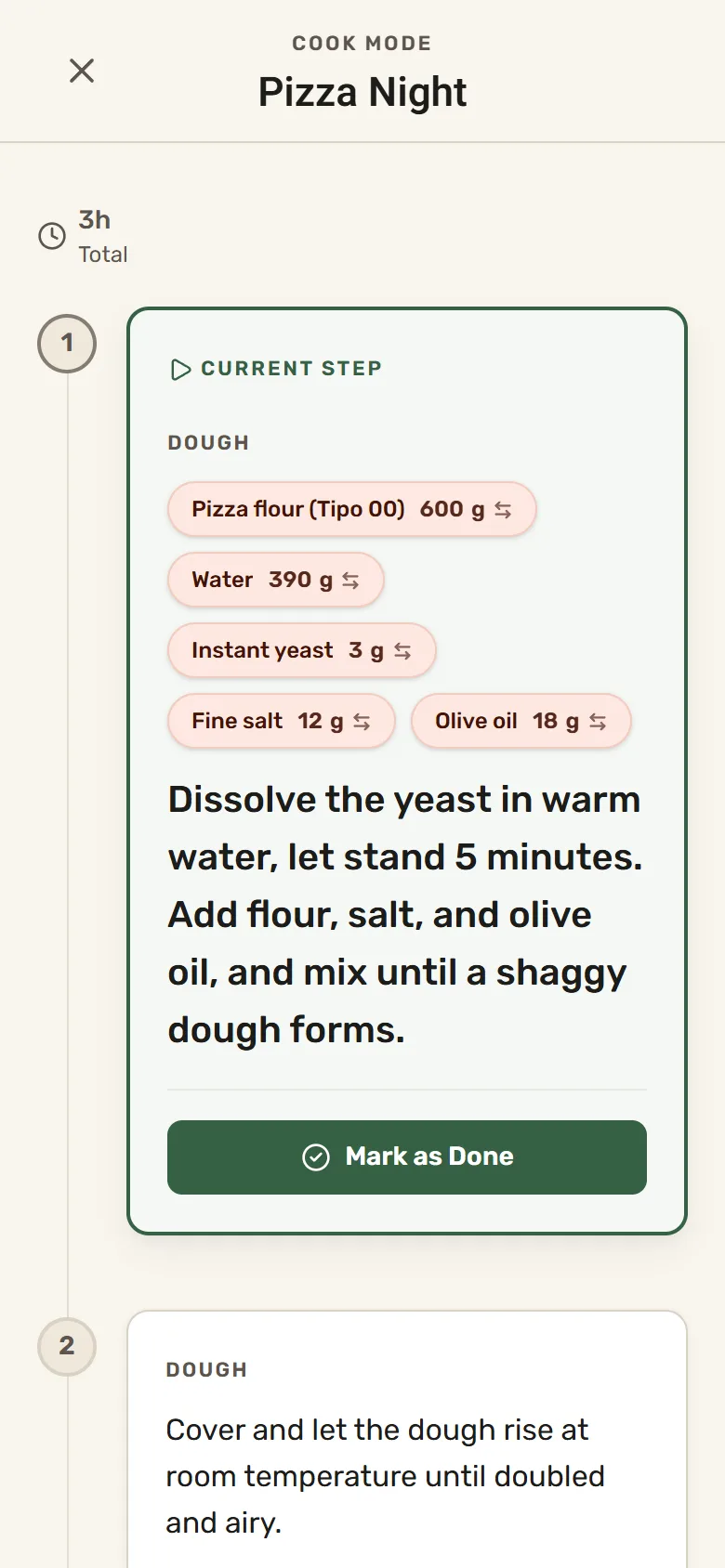
Cook mode that keeps up with you
One step at a time, with the ingredients that step uses right next to it.
- Tap-to-start timers, down to the second
- The screen stays awake while you cook
- Pick up where you left off, even after a reload
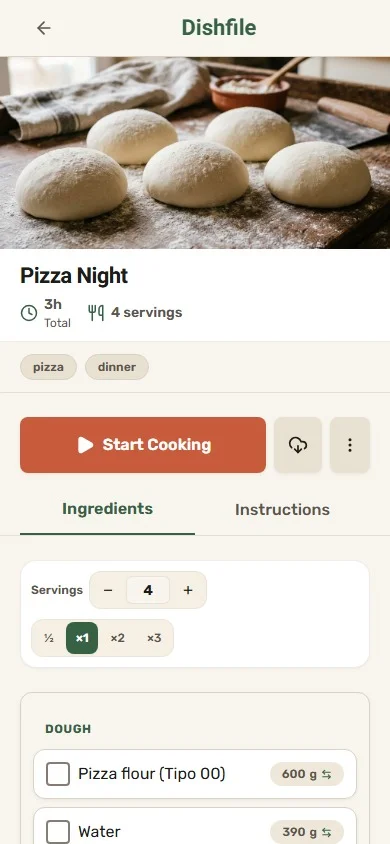
Powerful where it counts, simple everywhere else
AI import, reviewed by you
Hand Dishfile a link, a photo or a document. Its AI fills in the recipe, picks a photo from the page and keeps the source credit — and you review everything before it's saved.
Translate English ↔ Hebrew
Translate a saved recipe with one AI credit. Quantities, units and timers stay exactly as they were, and cook mode follows the language you read in.
Make the dough once, use it everywhere
Save a dough, sauce or filling as a reusable component and use it in any recipe. Improve it once and every recipe that uses it stays right.
Dietary, kosher & allergen flags
Mark ingredients as vegan, gluten-free, kosher or halal, or with allergens. Each recipe shows its status automatically.
Share, print and save
Send a live link that stays current, print or save a recipe as PDF, and keep recipes friends share with you.
Cost every recipe
Add what ingredients cost and see what each recipe costs to make. Selling what you make? Add labor and packaging and get a suggested price.
And the little things
- Switch an ingredient's unit
- Kitchen fractions (½, ⅓, 1½)
- Prepare-ahead warnings
- Print or save as PDF
- Previously synced recipes available offline
- Dark mode
- Full data export
- Works in English and Hebrew
Try a real recipe — no account needed
These live recipes use components and interactive controls. Open one and change the batch to watch every quantity follow.


Made in a home kitchen
I'm a home baker and cook, and Dishfile started with a frustration I experienced myself. Recipes from friends and family were getting lost among starred WhatsApp messages, while others were scattered across browser bookmarks or buried somewhere in my Google searches.
I wanted one place where I could keep all my recipes, edit and adapt them to my taste, and easily share my own versions with others. So I decided to build Dishfile.
I hope Dishfile becomes a place where you, too, can keep all the recipes you love, make them your own, and enjoy them for years to come. And if there's anything that could make it better for you, I'd genuinely love to hear it. After all, I'm building this app for people who love cooking and baking just as much as I do.
What early users say
For years, my recipes were scattered everywhere. Now I finally have them all in one place, and whenever my children or grandchildren ask for a recipe, I can share it with them in seconds!
As a programmer, I'm always impressed by technology that actually makes life easier. Dishfile's AI import is exactly this — turning a recipe from a photo or a website into an organized, editable recipe without having to type everything manually.
Your recipes, on your terms
Yours to manage
Your notebook is yours to manage, export and delete, any time.
Private unless you share
Recipes stay private until you choose to share a link or invite someone in.
No ads
Dishfile has no ads. Your recipes are not used to sell you anything.
Selling what you make?
Turn the same recipes into costed, priced products. Ingredient costs roll through your components into every dish, so you know your margin before you set a price.
- Batch and unit cost from real ingredient prices
- Labor, packaging and overhead per batch
- Margin and a suggested price for your target
Start free. Stay free.
The Free plan is free — no trial, no expiry. Larger plans are open at no cost during early access, on request.
Compare plansQuestions, answered
Is Dishfile really free?
Yes. The Free plan has no trial and no expiry: 10 recipes, 50 ingredients and 3 AI credits a month for imports and translations. Larger plans are open at no cost during early access, on request. If that ever changes, you'll hear about it first, and you can export everything at any time.
What can I import, and from where?
Recipe websites, photos of recipe cards, PDF and Word (.docx) files, and pasted text. Dishfile reads them and fills in the recipe for you to review before saving. Links to social posts are read like any web page; Dishfile does not transcribe videos.
Is there an app for Android or iPhone?
Dishfile runs in any modern browser and installs like an app on Android and iPhone. On Android you can also get it from Google Play. Recipes you've already synced stay available offline.
Does it work in Hebrew?
Yes. The whole app works in English and Hebrew with full right-to-left layout, and you can translate a saved recipe between the two with one AI credit.
What is a "component"?
A reusable part of a recipe — a dough, sauce, filling or spice blend — that you save once and use in many recipes. Improve it in one place and every recipe that uses it stays consistent.
Do I need to be a professional?
No. Home cooks use Dishfile to save, scale and cook. The costing and pricing tools are there when you need them, for instance if you start selling what you bake.
What happens to my data?
Your notebook is yours to manage, export and delete, and recipes are private unless you choose to share them. Export and account deletion are built in.
Your next favorite recipe deserves a better home
Free to start, no credit card. Save a recipe from a link in under a minute.